Importing Request for Payment File
How to Importing Real-Time Payments Request for Payment File
Importing Request for Payment File – ISO 20022 Uploads for Real-Time AR Automation
Importing Request for Payment File is the backbone of scalable, real-time AR processing. With ISO 20022 as the messaging format, businesses can securely upload, import, and automate payment requests across all major U.S. financial institutions using the FedNow® Service and RTP® network.
This allows merchants to send structured Request for Payment (RfP) messages in bulk—triggering real-time collections, accurate reconciliation, and instant visibility into accounts receivables across all payment aliases and divisions.
Real-Time AR Starts With Structured Uploads
Real-time payments aren't just about speed—they're about structure. By leveraging ISO 20022, your business can import Request for Payment files directly into our AR software platform. Each file contains structured data aligned to global messaging standards, enabling you to send out payment requests, match incoming payments, and reconcile in real time.
Using alias-based identifiers like mobile numbers or email addresses tied to unique MIDs, we make it simple to route payments, track activity across banks, and stay compliant—all without ever visiting a branch.
Key Features of Importing Request for Payment File
ISO 20022-Compliant File Formatting
Create and upload RfP files formatted to ISO 20022 standards for
compatibility with RTP® and FedNow® rails, ensuring regulatory
consistency and global messaging support.
Bulk Uploads and Scheduled File Imports
Upload multiple RfPs at once and schedule recurring imports for
recurring invoicing cycles. Save time and automate billing across
all customer types.
Alias-Based MID Management for Customer
Matching
Assign MIDs to email addresses or phone numbers
for every payer, allowing the system to reconcile each real-time
transaction correctly—no matter the bank.
FedNow® and RTP® Real-Time Rail
Integration
Once files are uploaded, your system triggers
RfPs across either FedNow® or RTP®, depending on bank
compatibility—ensuring 24/7 real-time settlement and AR
visibility.
Bank-Agnostic Uploads Across All 50 States
Upload and download files that interact with accounts across
multiple U.S. financial institutions—ideal for franchises,
distributed teams, or national operations.
Hosted Payment Page with Every RfP
Each imported RfP includes a hosted payment page link, making it
easy for customers to click and complete payment securely via
mobile or desktop.
QuickBooks® Online Reconciliation
Payments triggered by file uploads are automatically matched to
invoices and synced into QuickBooks® QBO for full accounting
transparency.
Why Businesses Choose TodayPayments.com for RfP File Uploads
1. Real-time FedNow® and RTP® transaction
routing based on file imports
2. Multi-alias support for
up to 100+ phone/email MIDs across banks
3. Structured
ISO 20022 message formatting for uploads and responses
4. Instant onboarding—no bank visit required
5.
Nationwide support for every merchant type, including high-risk
6. Integrated hosted payment pages with tracking and
confirmation
7. Secure dashboard to manage uploads,
downloads, and batch status
Importing a Real-Time Payment (RTP) file into your financial institution's dashboard typically involves uploading a file containing payment instructions in a format compatible with your institution’s payment processing system. Many financial institutions support ISO 20022 XML, CSV, JSON, or other formats, depending on their internal systems. Below is a guide to help you import a Real-Time Payment file through your financial institution’s dashboard.
Step-by-Step Guide to Import Real-Time Payment File into Financial Institution’s Dashboard
1. Obtain the Real-Time Payment (RTP) File
You need to first generate or receive the Real-Time Payment file from the payer or payment requestor. The file should be in a format that is supported by your financial institution, typically:
- ISO 20022 XML: Used widely in real-time payment systems like FedNow, SEPA, and SWIFT.
- CSV: Simple format that some financial systems support.
- JSON: Often used in API-based transactions and modern financial platforms.
- XML (Non-ISO 20022): A more flexible XML format.
Ensure that the file contains the correct payment details, including:
- Transaction ID
- Sender and Receiver Information
- Amount
- Currency
- Date
- Payment Reference
2. Log Into Your Financial Institution’s Dashboard
- Open your financial institution’s online banking or payment processing portal.
- Make sure that you have the appropriate permissions to upload files (this may require admin or finance-level access).
3. Navigate to the Payment or File Upload Section
- In most banking or payment dashboards, you’ll find an option under Payments, Transfers, or File Upload for uploading payment files.
- Look for labels like Real-Time Payments, FedNow, Immediate Payments, or ISO 20022.
4. Upload the Real-Time Payment (RTP) File
For ISO 20022 XML Format:
- Select the ISO 20022 XML option from the available formats.
- Browse your local system and select the XML file to upload.
- Some systems may validate the XML schema (pain.001 for payments or pain.013 for payment requests), so make sure your file adheres to the required structure.
For CSV Format:
- If the platform accepts CSV files, ensure your CSV file is formatted properly with the required fields (Transaction ID, Sender, Receiver, Amount, Date, etc.).
- Upload the file by selecting CSV as the file type.
- In some cases, you may need to map the fields in the CSV to the corresponding fields in the dashboard.
For XML (Non-ISO 20022) Format:
- Choose XML as the file format if your system supports it.
- Make sure the XML file structure is compatible with your institution's schema.
- Upload the file using the file upload section of the dashboard.
For JSON Format:
- If your financial institution uses API-based platforms or modern web interfaces, they may allow JSON file uploads.
- Choose JSON from the list of accepted formats, and upload your JSON file.
5. Validate and Review the Upload
After uploading the RTP file:
- Validation: Many systems will run a validation check to ensure that the data in the file is correct and adheres to the schema expected by the institution.
- Errors: If there are any errors (e.g., invalid account numbers, currency mismatches, incorrect formatting), the system will provide feedback, and you will need to correct and re-upload the file.
6. Review Payment Details
Once the file is validated:
- Review the payment details such as Amount, Sender, Receiver, and Reference information to ensure everything is correct.
- If your system allows batch payments, make sure all payments are accounted for.
7. Confirm the Import
After confirming that the data in the file is accurate:
- Submit the import request.
- Your financial institution’s system will process the file and initiate the real-time payments.
8. Monitor the Payment Status
Once the file is processed:
- You may be able to track the status of the real-time payments in the Transaction History or Payment Monitoring section of your financial institution’s dashboard.
- Payments typically move quickly through real-time systems, so expect the funds to be transferred almost immediately once processed.
9. Reconcile and Confirm the Payments (Optional)
For businesses, after importing and completing payments:
- Reconcile the payment transactions with your accounting system or ERP.
- Match the payments made via the RTP file with your invoices or payment requests to confirm everything is aligned.
Example Formats:
ISO 20022 XML Example:
<?xml version="1.0" encoding="UTF-8"?>
<Document xmlns="urn:iso:std:iso:20022:tech:xsd:pain.001.001.03">
<CstmrCdtTrfInitn>
<GrpHdr>
<MsgId>RTP-123456789</MsgId>
<CreDtTm>2024-09-13T10:00:00</CreDtTm>
<NbOfTxs>1</NbOfTxs>
<CtrlSum>500.00</CtrlSum>
<InitgPty>
<Nm>John Doe</Nm>
</InitgPty>
</GrpHdr>
<PmtInf>
<PmtInfId>Payment-123</PmtInfId>
<PmtMtd>TRF</PmtMtd>
<BtchBookg>false</BtchBookg>
<NbOfTxs>1</NbOfTxs>
<CtrlSum>500.00</CtrlSum>
<PmtTpInf>
<SvcLvl>
<Cd>URGP</Cd>
</SvcLvl>
</PmtTpInf>
<Dbtr>
<Nm>John Doe</Nm>
<PstlAdr>
<Ctry>US</Ctry>
</PstlAdr>
</Dbtr>
<DbtrAcct>
<Id>
<IBAN>US123456789012345678</IBAN>
</Id>
</DbtrAcct>
<Cdtr>
<Nm>Jane Smith</Nm>
<PstlAdr>
<Ctry>US</Ctry>
</PstlAdr>
</Cdtr>
<CdtrAcct>
<Id>
<IBAN>US987654321098765432</IBAN>
</Id>
</CdtrAcct>
<Amt>
<InstdAmt Ccy="USD">500.00</InstdAmt>
</Amt>
<RmtInf>
<Ustrd>Invoice-98765</Ustrd>
</RmtInf>
</PmtInf>
</CstmrCdtTrfInitn>
</Document>
CSV Example:
TransactionID,SenderName,SenderAccountNumber,ReceiverName,ReceiverAccountNumber,Amount,Currency,PaymentDate,Reference
RTP-12345,John Doe,123456789,Jane Smith,987654321,500.00,USD,2024-09-13,Invoice-98765
JSON Example:
{
"RealTimePayment": {
"TransactionID": "RTP-12345",
"Amount": {
"currency": "USD",
"value": "500.00"
},
"Sender": {
"Name": "John Doe",
"AccountNumber": "123456789"
},
"Receiver": {
"Name": "Jane Smith",
"AccountNumber": "987654321"
},
"PaymentDate": "2024-09-13",
"Reference": "Invoice-98765"
}
}
Common Considerations:
- Format: Ensure the file format is compatible with your financial institution’s system.
- Schema Validation: Check for errors before final submission, especially in ISO 20022 XML files, as schema validation can fail if there are issues with the structure.
- Instant Payment Processing: Real-time payments are processed instantly, so double-check all details before submission.
- Reconciliation: After processing, reconcile the payment with your internal records, especially for businesses.
Let us at TodayPayments.com know if you need further details on working with any specific format or financial platform!
Upload, Trigger, and Collect at TodayPayments.com
Still processing receivables one invoice at a
time?
Let real-time automation do the heavy lifting.
✅ Upload ISO 20022 Request for
Payment files instantly
✅ Trigger real-time RfPs
across FedNow® and RTP® rails
✅
Track every alias with custom MIDs for your payers
✅
Manage AR from multiple banks and reconcile in QuickBooks®
✅ Eliminate paperwork and delays—no bank
visit needed
Start importing RfP files today at
https://www.TodayPayments.com
Importing Request for
Payment File – The Future of AR Starts with a Simple Upload.
Creation Request for Payment Bank File
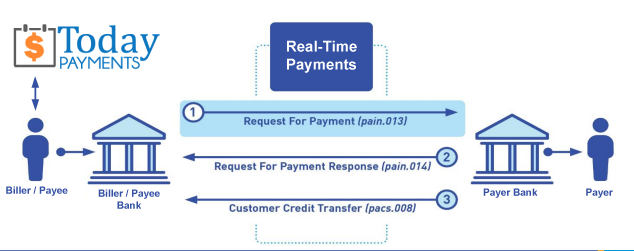
Call us, the .csv and or .xml Request for Payment (RfP) file you need while on your 1st phone call! We guarantee our reports work to your Bank and Credit Union. We were years ahead of competitors recognizing the benefits of RequestForPayment.com. We are not a Bank. Our function as a role as an "Accounting System" in Open Banking with Real-Time Payments to work with Billers to create the Request for Payment to upload the Biller's Bank online platform. U.S. Companies need help to learn the RfP message delivering their bank. Today Payments' ISO 20022 Payment Initiation (PAIN .013) show how to implement Create Real-Time Payments Request for Payment File up front delivering message from the Creditor (Payee) to it's bank. Most banks (FIs) will deliver the message Import and Batch files for their company depositors for both FedNow and Real-Time Payments (RtP). Once uploaded correctly, the Creditor's (Payee's) bank continuing through a "Payment Hub", will be the RtP Hub will be The Clearing House, with messaging to the Debtor's (Payer's) bank.
... easily create Real-Time Payments RfP files. No risk. Test with your bank and delete "test" files before APPROVE on your Bank's Online Payments Platform.
Today Payments is a leader in the evolution of immediate payments. We were years ahead of competitors recognizing the benefits of Same-Day ACH
and Real-Time Payments funding. Our business clients receive faster
availability of funds on deposited items and instant notification of
items presented for deposit all based on real-time activity.
Dedicated to providing superior customer service and
industry-leading technology.

1) Free ISO 20022 Request for Payment File Formats, for FedNow and Real-Time Payments (The Clearing House) .pdf for you manually create "Mandatory" (Mandatory data for completed file) fields, start at page 4, with "yellow" highlighting. $0.0 + No Support
2) We create .csv or .xml formatting using your Bank or Credit Union. Create Multiple Templates. Payer/Customer Routing Transit and Deposit Account Number may be required to import with your bank. You can upload or "key data" into our software for File Creation of "Mandatory" general file.
Fees = $57 monthly, including Support Fees and Batch Fee, Monthly Fee, User Fee, Additional Payment Method on "Hosted Payment Page" (Request for file with an HTML link per transaction to "Hosted Payment Page" with ancillary payment methods of FedNow, RTP, ACH, Cards and many more!) + $.03 per Transaction + 1% percentage on gross dollar file,
3) Payer Routing Transit and Deposit Account Number is NOT required to import with your bank. We add your URI for each separate Payer transaction.
Fees Above 2) plus $29 monthly additional QuickBooks Online "QBO" formatting, and "Hosted Payment Page" and WYSIWYG
4) Above 3) plus Create "Total" (over 600 Mandatory, Conditional & Optional fields of all ISO 20022 Pain .013) Price on quote.
Each day, thousands of businesses around the country are turning their transactions into profit with real-time payment solutions like ours.
Activation Dynamic RfP Aging and Bank Reconciliation worksheets - only $49 annually
1. Worksheet Automatically Aging for Requests for Payments and Explanations
- Worksheet to determine "Reasons and Rejects Coding" readying for re-sent Payers.
- Use our solution yourself. Stop paying accountant's over $50 an hour. So EASY to USE.
- No "Color Cells to Match Transactions" (You're currently doing this. You won't coloring with our solution).
- One-Sheet for Aging Request for Payments
(Merge, Match and Clear over 100,000 transactions in less than 5 minutes!)
- Batch deposits displaying Bank Statements are not used anymore. Real-time Payments are displayed "by transaction".
- Make sure your Bank displaying "Daily FedNow and Real-time Payments" reporting for "Funds Sent and Received". (These banks have Great Reporting.)
Contact Us for Request For Payment payment processing